> ## Documentation Index
> Fetch the complete documentation index at: https://docs.luxalgo.com/llms.txt
> Use this file to discover all available pages before exploring further.
# Exit Conditions
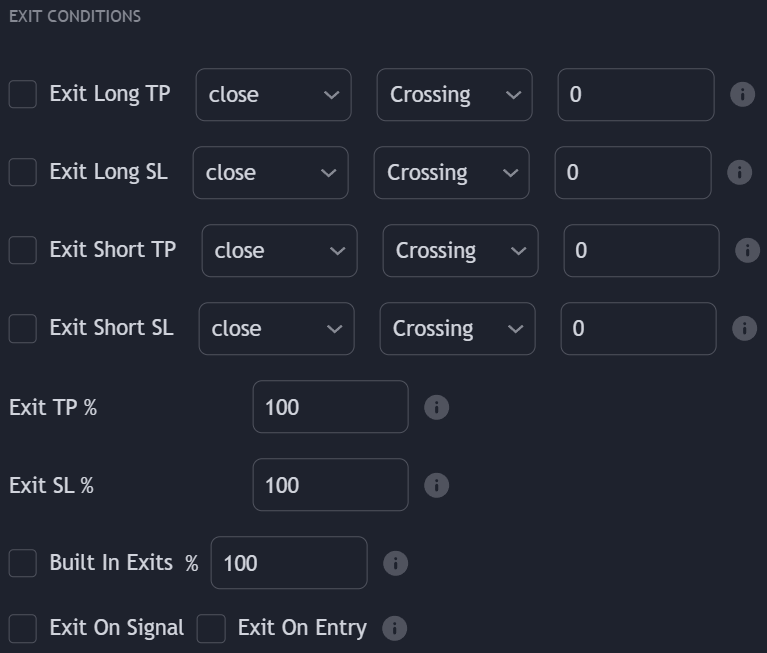 Users can close any position on a profit or loss using specific crossing conditions obtained from a user-selected external source and/or by using our builtins exits. Exit conditions can be enabled in the **EXIT CONDITIONS** settings section.
## External Exits
### Exit Take Profit
Long/Short take profits exit conditions will exit a long or short position when a set condition is met such that the position exits on a profit.
Take profits conditions are triggered if they are toggled on for a specific order (Long/Short) and if the selected external source is either **Crossing**, **Crossing Up**, or **Crossing Down**, **Greater Than**, **Lower Than**, or **Equal** to the numerical value specified by the user.
### Exit Stop Losses
Long/Short stop-losses exit conditions will exit a long or short order when a set condition is met such that the position exits on a loss.
Stop losses conditions are triggered if they are toggled on for a specific order (Long/Short) and if the selected external source is either **Crossing**, **Crossing Up**, or **Crossing Down**, **Greater Than**, **Lower Than**, or **Equal** to the numerical value specified by the user.
### Placeholders
Users can close any position on a profit or loss using specific crossing conditions obtained from a user-selected external source and/or by using our builtins exits. Exit conditions can be enabled in the **EXIT CONDITIONS** settings section.
## External Exits
### Exit Take Profit
Long/Short take profits exit conditions will exit a long or short position when a set condition is met such that the position exits on a profit.
Take profits conditions are triggered if they are toggled on for a specific order (Long/Short) and if the selected external source is either **Crossing**, **Crossing Up**, or **Crossing Down**, **Greater Than**, **Lower Than**, or **Equal** to the numerical value specified by the user.
### Exit Stop Losses
Long/Short stop-losses exit conditions will exit a long or short order when a set condition is met such that the position exits on a loss.
Stop losses conditions are triggered if they are toggled on for a specific order (Long/Short) and if the selected external source is either **Crossing**, **Crossing Up**, or **Crossing Down**, **Greater Than**, **Lower Than**, or **Equal** to the numerical value specified by the user.
### Placeholders
 Users who do not wish to use a numerical value to evaluate a condition with an external source may use a placeholder instead, which allows price data to be used. The following placeholders are supported:
* `open` : Opening price
* `high` : High price
* `low` : Low price
* `close` : Closing price
* `hl2` : Median price
* `ohlc4` : Average price
* `hlc3` : Typical price
* `hlcc4` : Weighted price
## Builtins Exits
Built-in exits are included for the selected signal algorithm, these are the same as the ones present in the Signals & Overlays® toolkit and can be used in the Backtester to exit positions.
Built-in exits will always exit a position on a profit.
## Time Exits
Time exits allow users to exit trade at a specific time of the day. Note that trades are still exited at the opening of the next bar.
The timezone is the same as the one on the chart symbol.
## Exit On Signal
Enabling the **Exit On Signal** setting will close any position once a new confirmation or contrarian signal is generated (if enabled).
## Exit on Entry
Enabling the **Exit On Entry** setting will close any existing position when an entry condition leading to a new opposite position is met.
## Partial Exits
Users who do not wish to use a numerical value to evaluate a condition with an external source may use a placeholder instead, which allows price data to be used. The following placeholders are supported:
* `open` : Opening price
* `high` : High price
* `low` : Low price
* `close` : Closing price
* `hl2` : Median price
* `ohlc4` : Average price
* `hlc3` : Typical price
* `hlcc4` : Weighted price
## Builtins Exits
Built-in exits are included for the selected signal algorithm, these are the same as the ones present in the Signals & Overlays® toolkit and can be used in the Backtester to exit positions.
Built-in exits will always exit a position on a profit.
## Time Exits
Time exits allow users to exit trade at a specific time of the day. Note that trades are still exited at the opening of the next bar.
The timezone is the same as the one on the chart symbol.
## Exit On Signal
Enabling the **Exit On Signal** setting will close any position once a new confirmation or contrarian signal is generated (if enabled).
## Exit on Entry
Enabling the **Exit On Entry** setting will close any existing position when an entry condition leading to a new opposite position is met.
## Partial Exits
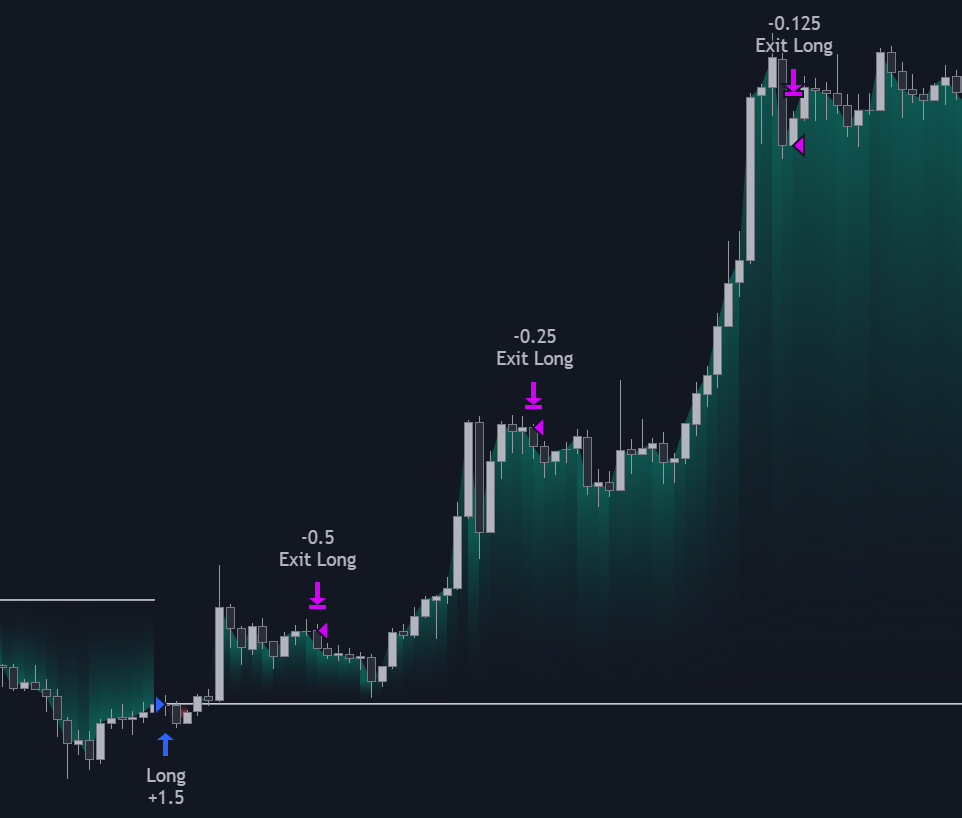 Users can exit a percentage of an existing position by specifying a percentage lower than 100%.
This can lead to sequential exits, with reduced exposure each time an exit is triggered.
Users can exit a percentage of an existing position by specifying a percentage lower than 100%.
This can lead to sequential exits, with reduced exposure each time an exit is triggered.