> ## Documentation Index
> Fetch the complete documentation index at: https://docs.luxalgo.com/llms.txt
> Use this file to discover all available pages before exploring further.

# How To Get Updates

<div style={{ position: 'relative', paddingBottom: '56.25%', height: 0, overflow: 'hidden' }}>
  <iframe
    style={{
  position: 'absolute',
  top: 0,
  left: 0,
  width: '100%',
  height: '100%',
}}
    src="https://www.youtube.com/embed/BHW0kxavvqA"
    frameBorder="0"
    allowFullScreen
  />
</div>

## Applying An Update

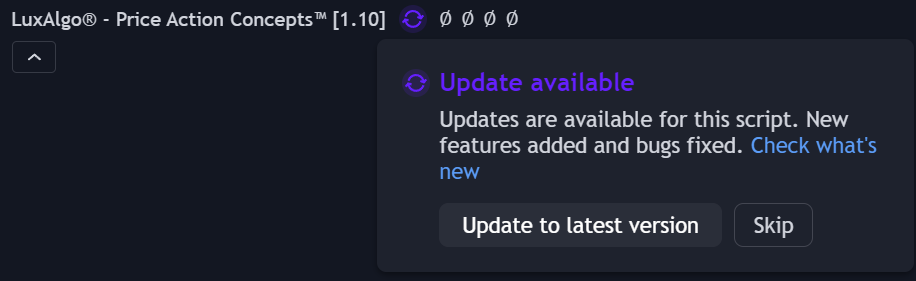
On Tradingview updates are easy to apply. Once an update is available, refresh your chart, then a purple 🔄 icon will be visible near the indicator title, click on it and click on "Update to latest version".

<img src="https://mintcdn.com/luxalgo/-Cu8R2acNraf_ZS4/public/images/how-to-update/update.png?fit=max&auto=format&n=-Cu8R2acNraf_ZS4&q=85&s=6bacad31fca5d993ef75f757e561fea9" alt="" width="916" height="281" data-path="public/images/how-to-update/update.png" />

You can also apply an update by following these steps:

1. Refresh your browser or mobile app
2. Remove the indicator from your chart
3. Re-add it from your invite-only indicators

The latest version of the indicator should appear.
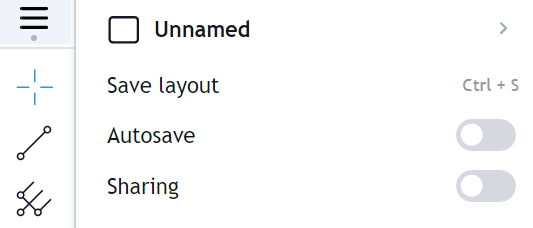
<Tip>
  Make sure to save your **Chart Layout** on Tradingview after successfully installing an update so you can ensure it will stay
</Tip>

<img src="https://mintcdn.com/luxalgo/-Cu8R2acNraf_ZS4/public/images/how-to-update/image172.png?fit=max&auto=format&n=-Cu8R2acNraf_ZS4&q=85&s=1f762e14542c079fb9397a7c1f7d8481" alt="" width="533" height="228" data-path="public/images/how-to-update/image172.png" />

## Receiving Updates Notifications

We always announce our updates on our community Discord server & [X Account](https://x.com/LuxAlgo). You can also receive update notifications on your TradingView charts directly by going to:

`settings -> notifications -> SCRIPTS YOU'VE ADDED TO FAVORITES OR LIKED`

<img src="https://mintcdn.com/luxalgo/-Cu8R2acNraf_ZS4/public/images/how-to-update/image125.png?fit=max&auto=format&n=-Cu8R2acNraf_ZS4&q=85&s=c07de7dc2fbc3d64dda67b50b9ccd1c0" alt="" width="695" height="112" data-path="public/images/how-to-update/image125.png" />

<Tip>
  Make sure to follow the LuxAlgo account on [TradingView](https://www.tradingview.com/u/LuxAlgo/#published-scripts) to ensure you are notified when we push updates with new features to our exclusive tools!
</Tip>
