LuxAlgo

Features

Quant provides a comprehensive set of features designed to help you create, refine, and deploy Pine Script® indicators and strategies. This page covers the core capabilities available in the Quant interface.

Code Generation

Quant can generate complete Pine Script® code based on your natural language descriptions. When Quant generates code, it appears in a split editor view, allowing you to review the generated script alongside the chat interface. You can copy the generated code using the copy button and paste it directly into TradingView® to add the indicator to your charts.

The code cannot be copied while Quant is actively generating code. Wait for the generation to complete before using the copy button.

Quant leverages its access to both TradingView scripts and LuxAlgo's proprietary script library to reliably handle niche and complex concepts. This dual knowledge base enables Quant to generate more relevant and code of higher quality.

Instant Visualization

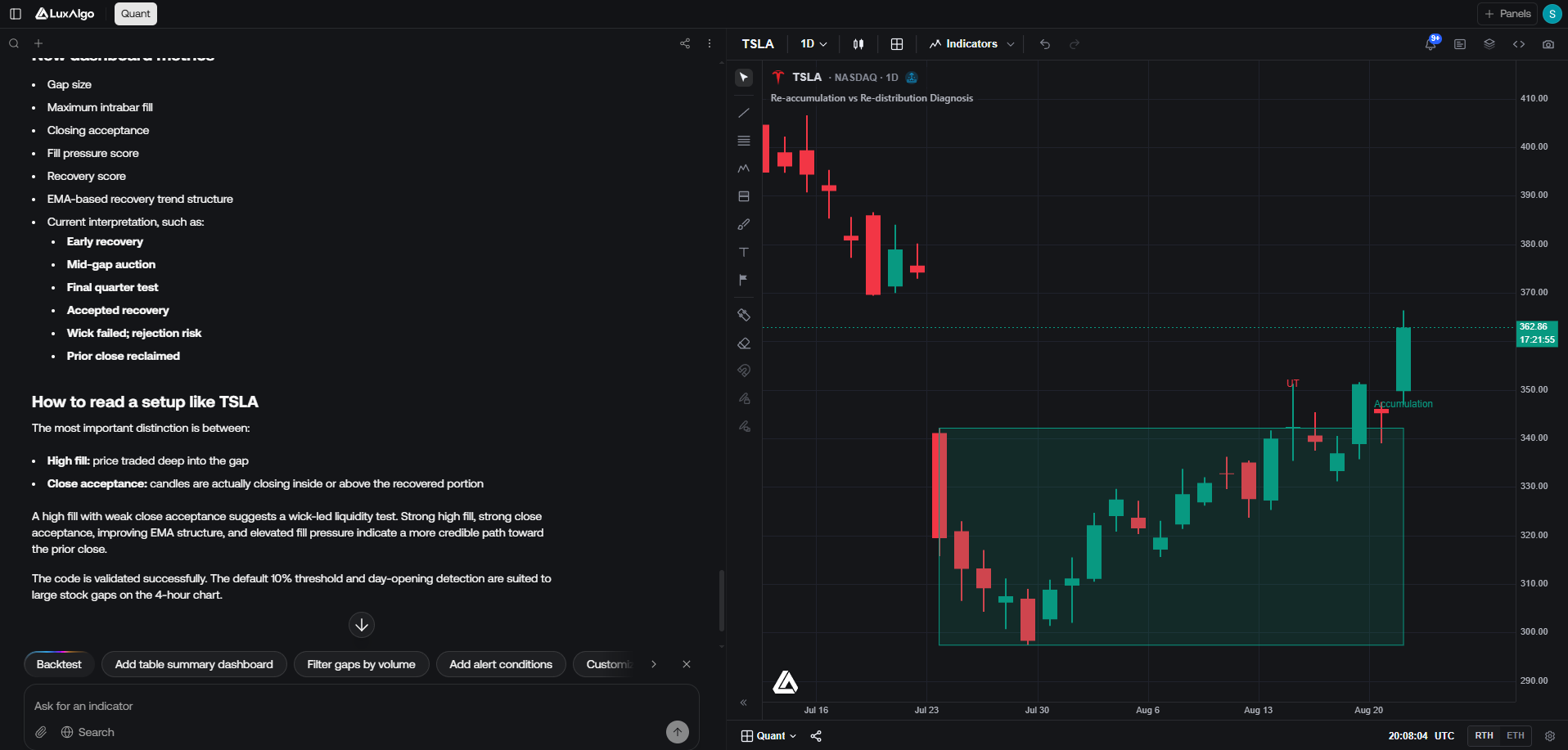
Once generated, indicators can be displayed in a chart for direct visual feedback. Strategy scripts can also be run and backtested on the chart — see Backtesting.

Displayed results may differ from what could be seen on TradingView®.

Not all indicators are compatible with our chart and may only be displayed on TradingView® charts.

Users can access data from the following assets:

  • Stocks
  • Cryptocurrencies
  • Forex
  • Commodities

on the follwoing timeframes: 1 minute, 5 minutes, 15 minutes, 30 minutes, 1 hour, 4 hours, 1 day.

Due to data limitations, only completed candles are returned. Users may experience a one candle delay across assets

Image to Code

You can upload images of indicators or chart setups, by pasting them directly in the prompt input, uploading them from the upload image button, or by clicking on "Generate From Image", and Quant will analyze the visual representation to generate Pine Script® code that reproduces the indicator's behavior as closely as possible.

Additionally, you can send images during your conversation to provide more context or refine Quant's understanding of your requirements. This helps Quant better interpret complex visual patterns and generate more accurate code.

You can attach chart images directly to the chat input prompt from the camera icon in the chart header and clicking on "Attach to chat".

Backtesting

Once a script uses a strategy(...) declaration, running it on the chart computes trade history and performance statistics in real time—no need to copy the code to TradingView® first.

Converting Indicators to Backtests

Indicators are not backtested as-is. To evaluate an indicator's logic as a strategy, use the Backtest button in the toolbar, or ask Quant to convert the current indicator into a backtestable strategy. Quant rewrites the script with the appropriate strategy(...) declaration and entry/exit logic while preserving the original concept.

The toolbar Backtest action is only shown when the editor holds indicator code (not already a strategy).

Running a Backtest

Click Run after your script is a strategy. The chart displays the strategy alongside a Backtest Summary strip below it, showing:

  • Net Profit
  • Trades
  • Win Rate (with winning and losing trade counts)
  • Max Drawdown (absolute and percentage)
  • Profit Factor
  • Historical net profit chart (toggleable)

Use the maximize button on the summary strip to open the full backtest viewer.

Backtest Viewer

The maximized backtest viewer provides detailed analytics across three tabs:

  • Performance — historical net profit chart, summary metrics, net daily P&L, weekday performance, and a performance table (all trades, longs, and shorts)
  • Trades Analysis — P&L distribution, win rate breakdown, duration vs. P&L scatter plot, and a trades analysis table
  • Trades Log — a searchable trade log with entry, exit, net P&L, and cumulative P&L; switch to calendar view to review daily results

From the maximized viewer you can change the symbol and timeframe to re-run the backtest on different market data without leaving Quant.

Script Settings

Open the settings gear in the toolbar to tune how a strategy runs:

  • Inputs — adjust the script's declared input.* parameters. Changes apply immediately and re-run the backtest, similar to TradingView®.
  • Properties — configure backtest settings such as initial capital, default order size (quantity, base currency, or % of equity), pyramiding, commission, slippage, and margin for long and short positions.

Properties apply only to strategy scripts. Indicator scripts expose the Inputs tab when they declare inputs.

Saving Strategies

Save a backtest using the star icon in the summary strip or maximized viewer. Saved strategies appear in the Saved Strategies sidebar and include the script code, chart symbol, timeframe, input overrides, and backtest properties from the run.

From the sidebar you can open a saved Quant strategy in a new conversation (See in Quant) to reproduce the same tuned backtest, or inspect its backtest configuration.

Backtest results may differ from what you observe on TradingView® due to differences in market data, fill logic, or processing.

Backtests use the same assets and timeframes available in Instant Visualization: stocks, cryptocurrencies, forex, and commodities on 1 minute, 5 minutes, 15 minutes, 30 minutes, 1 hour, 4 hours, and 1 day timeframes.

Bug Fixing

Quant can automatically identify and fix errors and warnings in your Pine Script® code. To fix all errors and warnings present in your script, use the "Fix with Quant" button in the editor.

Errors prevent the script from running, while warnings won't prevent execution but may cause unexpected results.

The editor also includes error and warnings highlighting for users more used to this.

You can hover on the error or warning button to get more information about them.

Runtime Errors

Quant can also help fix detected runtime errors. Unlike syntax errors runtime errors only appears once running the indicator over historical and/or newly formed candles.

If a runtime error is present, a message will appear at the bottom part of the chart.

Pine Script® Help

Quant has access to the complete Pine Script® knowledge base and can assist you with questions about Pine Script® syntax, functions, best practices, and implementation patterns. Whether you're learning Pine Script® or need clarification on specific concepts, Quant can provide accurate, context-aware answers based on official Pine Script® documentation.

Assisted Coding

For more experienced Pine Script® developers, Quant can assist with repetitive tasks and complex implementations. The integrated code editor is fully interactive and supports syntax/error highlighting as well as syntax completion, providing a professional coding environment.

The editor cannot be used while Quant is generating code. Wait for code generation to complete before making manual edits.

You can work collaboratively with Quant by making manual edits to the code, and Quant will learn from your changes to assist with subsequent iterations and refinements.

On this page